PHP intermittent errors are among the most frustrating production issues because the application can appear healthy between failures. A page works on the second refresh, one customer completes a task while another sees an error, or a scheduled process fails once and succeeds on its next run. That inconsistency can tempt teams to dismiss the problem as a transient hosting issue.
It is usually better to treat an intermittent failure as a pattern that has not yet been measured. The request, process, dependency, or server condition differs in some meaningful way. Finding that difference is the job.
If the error affects revenue, sign-ins, orders, data integrity, or a business-critical workflow, it may be more efficient to bring the evidence to a specialist through [PHP Bug Fixing](https://phprescue.dev/services/php-bug-fixing/). A focused investigation can isolate the failing path without turning a live incident into a risky series of guesses.
## What makes a PHP error intermittent?
A deterministic bug fails whenever the same conditions occur. An intermittent bug fails only when one of its hidden conditions is present. Those conditions commonly include:
– A specific input, account type, product, or record in the database
– A particular application server, PHP-FPM worker, or queue worker
– Traffic spikes, memory pressure, disk pressure, or exhausted connections
– A slow or unavailable API, mail service, payment provider, cache, or database
– A race condition between two requests changing the same data
– Session, cache, or cookie state that varies between visitors
– A background job that runs at the same time as the affected request
– An expired credential, rotated key, or temporary upstream rate limit
The phrase “intermittent” does not mean random. It means the relevant condition has not been connected to the failure yet.
## Start with a useful incident record
Before changing settings, plugins, dependencies, or code, capture a small record for every failure. A vague report such as “the site sometimes errors” is hard to investigate. A structured report can reveal a correlation quickly.
For each event, record:
1. **The exact time**, including timezone.
2. **The URL, route, command, webhook, or queue name** that failed.
3. **The HTTP method and response status**, where relevant.
4. **A request or correlation ID** if the application, proxy, or monitoring system provides one.
5. **The affected user, order, entity, or input type**, avoiding unnecessary personal data.
6. **What changed immediately before the error**, such as a submission, login, API call, or scheduled task.
7. **Whether retrying worked**, and how long the retry took.
8. **Relevant application, PHP, web-server, database, and worker log lines** from the same time window.
Use a consistent timezone across the records. A PHP error at 14:03 is much less useful if the reverse proxy log is recorded in UTC, the database log uses server local time, and the incident report uses a browser’s local time.
## Correlate the failed request across the stack
An exception message is important, but it may only describe the final symptom. A PHP request can fail because an upstream system was slow, a process was killed, a database connection was unavailable, or another request held a lock.
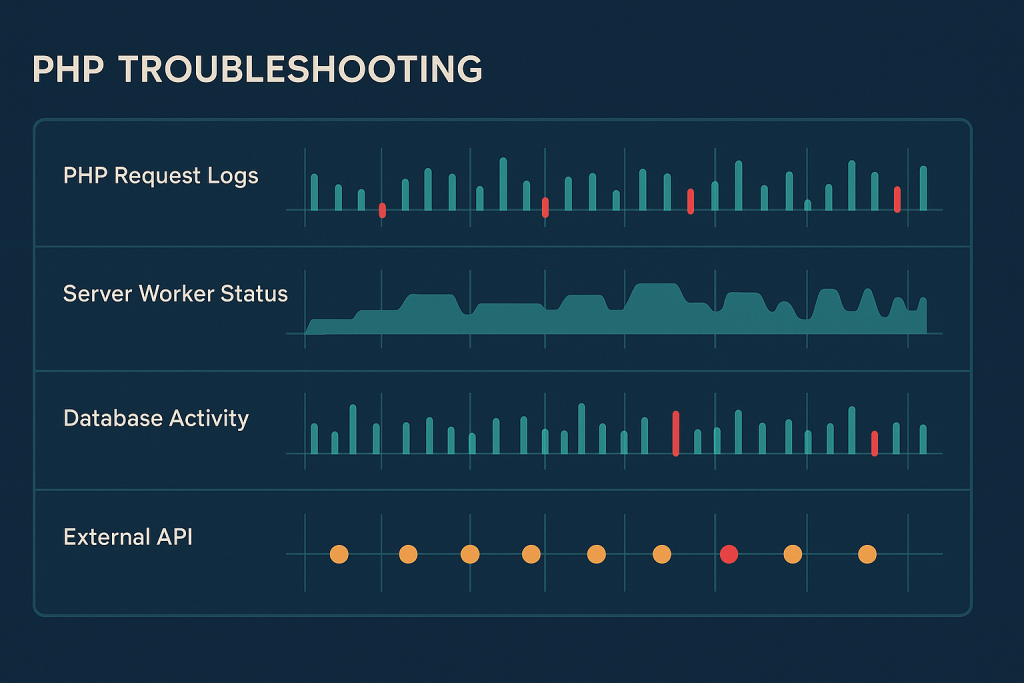
Build a timeline around the exact failure timestamp. Start with the application log, then compare it with:
– Web-server or reverse-proxy access and error logs
– PHP-FPM error logs and slow-request information
– Database errors, connection counts, slow queries, and lock activity
– Redis, Memcached, or other cache service logs
– Queue-worker and scheduler output
– External API response details and timeout messages
– Host resource metrics for CPU, memory, disk space, and network activity
Look for events that happen immediately before the PHP error. For example, a generic “allowed memory size exhausted” message may coincide with an unusually large export. A database timeout may line up with a bulk import. A 502 or 504 response may occur only while PHP-FPM workers are saturated.
Do not assume that a successful request after the error proves the system recovered by itself. It may simply have landed on a different worker or reached a dependency after a short-lived limit cleared.
## Check whether failures follow a request pattern
The fastest route to a cause is often identifying what failed requests have in common. Compare successful and failed examples carefully.
Ask practical questions:
– Does the issue affect one route or several unrelated routes?
– Does it happen only for logged-in users, administrators, or API clients?
– Is the affected data unusually large, old, incomplete, or in a particular state?
– Does it occur at a predictable time, such as during imports, backups, cron tasks, or peak traffic?
– Is one region, browser, device, or integration client overrepresented?
– Do failures occur only on POST requests or only when files are uploaded?
– Does a second attempt always work, sometimes work, or never work?
A recurring product ID, customer state, payload size, or API endpoint is a clue. It narrows the problem from “the whole PHP site” to a specific path and condition.
## Compare workers and servers, not only application code
Many intermittent PHP errors are caused by inconsistency between runtime processes. In a multi-server setup, one node may have a missing extension, outdated configuration, wrong environment variable, unavailable mounted path, or stale deployment artifact. On a single server, one long-lived PHP-FPM worker may be unhealthy while newer workers behave normally.
Where infrastructure permits, include the hostname, container ID, process ID, or worker identity in request logs. Then check whether failures cluster on one node or process. This is especially valuable when a load balancer sends similar requests to several servers.
Also separate execution contexts. A command that works through the web application may fail under CLI PHP. A queue worker may retain an old configuration until restarted. A scheduled task may run under a different user and lack access to files, credentials, or environment variables used by the web process.
Avoid broadly restarting every service before preserving evidence. A restart can relieve the symptom while removing the information needed to establish why it occurred. If recovery is urgent, document the state first and use a controlled restart with a clear timestamp.
## Investigate shared dependencies and transient limits
PHP code frequently depends on services outside the PHP process. A short timeout, rate limit, connection pool limit, DNS issue, database lock, or expired token can surface as an occasional application failure.
### Database contention and connection pressure
A database can be available overall while a single query blocks behind a lock or waits for capacity. Check whether slow requests coincide with imports, reporting, checkout activity, schema operations, or concurrent updates to the same records. Review transaction duration and avoid making broad database changes during a live investigation without a tested rollback plan.
### External APIs and webhooks
If an API call is involved, capture the endpoint, status code, response time, retry behavior, and safely redacted error body. A dependency that returns errors only at peak usage needs a different response from a reproducible code exception. Consider whether timeouts are realistic, retries are idempotent, and duplicate processing is possible after a retry.
### Cache and session behavior
An intermittent login, cart, or form problem can result from sessions not being shared consistently between nodes, cache entries expiring unexpectedly, or stale configuration in long-lived workers. Check whether the issue follows a particular server and whether session storage, cache connectivity, and key prefixes are consistent across the application.
## Look for race conditions and duplicate work
A race condition occurs when the outcome depends on timing between processes. It can appear as duplicate orders, occasional validation failures, missing updates, inconsistent stock values, or a process that reports a record is absent immediately after another process created it.
These issues are difficult to solve by adding delays or retries blindly. First identify the shared resource: a database row, cache key, file, order number, API operation, or job payload. Then determine which actions can happen concurrently and what should make the operation safe.
Useful evidence includes timestamps with milliseconds, unique request IDs, transaction boundaries, job IDs, and log messages before and after the shared operation. The eventual fix may involve database constraints, a transaction, a lock, idempotency keys, atomic operations, or a redesigned workflow. The right answer depends on the application’s actual consistency requirements.
## Reproduce safely without making production worse
Production data and real traffic often reveal the missing condition, but do not experiment recklessly on a live service. A safer approach is to reproduce the narrow case in staging using sanitized data and similar versions of PHP, extensions, configuration, services, and background processes.
If staging cannot reproduce the issue, add targeted observability instead of enabling broad debug output for every visitor. Log only the fields needed to distinguish the failure path, redact secrets and sensitive data, and remove temporary diagnostic logging once the cause is confirmed. Public debug output can expose application details and should not be enabled as a shortcut.
When the failure is causing an outage or financial impact, prioritize containment: reduce the failing traffic path if possible, pause the triggering automation, use a known-safe fallback, and preserve logs. For a severe live problem, [emergency website bug fixing](https://phprescue.dev/services/emergency-website-bug-fixing/) may be appropriate.
## Verify the fix against the original pattern
A fix is not complete merely because one retry succeeds. Return to the incident record and test the conditions that originally separated failures from successes.
Verification should include:
– The previously failing route, payload, or workflow
– Normal success cases, so the narrow fix has not introduced a regression
– Relevant web, CLI, queue, and scheduler contexts
– Multiple workers or nodes where applicable
– Dependency timeout, retry, and error paths when they can be tested safely
– Monitoring after release, with a clear observation period
Document the root cause, the change made, the evidence supporting it, and any follow-up work. That record makes the next incident faster to diagnose and prevents the same issue from returning unnoticed.
## When to get help with PHP intermittent errors
Seek hands-on help when failures affect transactions, authentication, data updates, customer communications, or a workflow that cannot safely be paused. It is also sensible to escalate when logs show a pattern but the cause crosses application code, PHP runtime configuration, workers, databases, and third-party services.
The most useful handoff includes the impact, start time, affected routes, recent changes, sanitized logs, deployment details, and access to a safe environment where the issue can be observed. Intermittent issues reward disciplined tracing: collect comparable evidence, identify the condition that changes, make one focused correction, and verify it under the same conditions.
## Frequently asked questions
### Why do PHP errors disappear when I refresh the page?
A refresh can use a different PHP worker, run after a temporary lock clears, receive a healthy response from an external service, or avoid the original timing condition. Treat the successful refresh as a comparison point, not proof that the issue is resolved.
### Can an intermittent PHP error be caused by hosting?
Yes. Resource exhaustion, process limits, inconsistent server configuration, storage problems, and network or DNS issues can all contribute. However, application behavior and dependencies should be checked alongside hosting metrics before assigning blame.
### Should I restart PHP-FPM when errors come and go?
A controlled restart can be a valid recovery action, especially when a service is degraded. Capture logs, resource state, and timestamps first if possible. Otherwise, the restart may clear the best evidence of an unhealthy worker, memory leak, or capacity issue.
### Do you work without a specific framework?
Yes. Intermittent PHP failures can occur in custom applications as well as framework-based systems. The investigation should follow the request path, runtime, dependencies, and background processes actually involved.
### Can you help if the stack includes WordPress or Laravel?
Yes. The same diagnostic principles apply, but the likely evidence sources differ. WordPress may involve plugins, themes, cron, sessions, and hosting layers, while Laravel may involve queues, caches, configuration, and application workers.