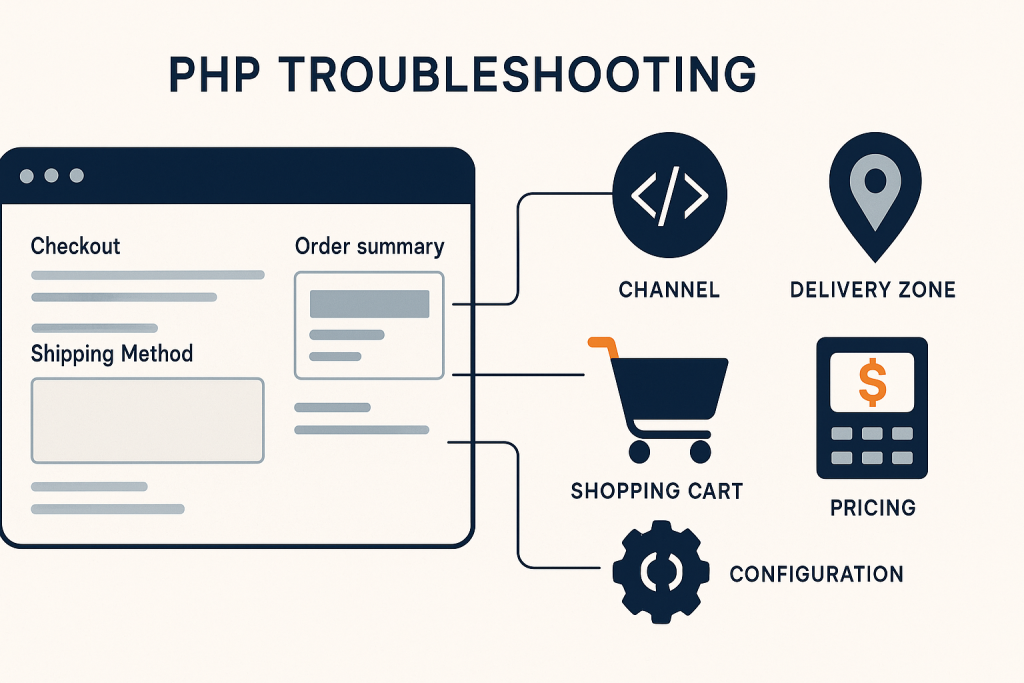
When a **Sylius shipping method not showing** issue appears, the checkout can look healthy right until the customer needs to select delivery. The cart contains products, the address may be valid, and payment may even be configured correctly—yet the shipping-method step is empty or reports that no method is available.
That symptom usually means Sylius has decided that none of the configured methods is eligible for the current checkout. The important word is *current*: shipping availability depends on the order’s channel, destination, currency, items, totals, and any custom eligibility logic. A method that works for one test cart can legitimately disappear for another.
This guide provides a safe order for tracing the problem. If the checkout is live and sales are being blocked, [Sylius Bug Fixing](https://phprescue.dev/services/sylius-bug-fixing/) can help investigate the failed flow without making speculative production changes.
## What “no shipping method available” usually means
A missing method is not always a broken template or a database problem. Sylius evaluates configured shipping methods against the checkout context and only returns the methods that qualify. Therefore, start by separating two situations:
1. **The checkout does not load shipping methods at all.** This may indicate a frontend request failure, a custom checkout integration issue, or an application error.
2. **The checkout loads but says no method is available.** This more often points to configuration or eligibility: zone matching, channel assignment, calculator rules, cart restrictions, or address data.
Use a reproducible test case before changing anything. Record the channel, currency, customer country and postcode, products in the cart, quantities, order total, and exact message shown. Those details make it possible to compare a failing order with one that works.
## Check whether the method is enabled for the active channel
In a multi-channel Sylius store, a shipping method can be correctly configured but unavailable because it is not assigned to the channel used by the storefront. This is easy to miss when an administrator is checking configuration in a different channel or testing through a local environment.
Confirm the following:
– The intended shipping method is enabled.
– It is associated with the active sales channel.
– The channel’s currency matches the configuration expected by the calculator or custom rules.
– The storefront domain, channel resolver, and checkout session all identify the channel you expect.
If the issue began after adding a new country storefront, a B2B channel, or a staging-to-production configuration import, channel assignment is an especially likely cause. Do not assume that a method visible in the admin panel is automatically active everywhere.
## Verify the shipping zone against the checkout address
Shipping zones determine where a method can be used. A method assigned to a Europe zone will not be offered for an address outside that zone. The same is true if a zone has been configured too narrowly or its members do not match the country and province data coming from checkout.
Check the actual address saved on the order rather than only the address entered in the browser. Pay attention to:
– Country code and whether the expected country is a member of the zone.
– Province or state restrictions, where applicable.
– The difference between billing and shipping address fields in a customized checkout.
– Test addresses with missing or unexpected values.
– Guest checkout handling, especially if an address is copied or normalized by custom code.
A common misleading scenario is a test performed with a default address that belongs to the right zone, while real customers use another territory. Test one known-good destination and one failing destination with the same cart. If the method appears for only one, the investigation should stay focused on zone and address eligibility.
## Review calculator settings and price configuration
A shipping method can be eligible by zone and channel but still fail when its calculator cannot produce a valid result. Flat-rate methods, rule-based calculations, custom calculators, and carrier integrations all have different failure modes.
For a standard configured method, review its calculator type and required settings. For custom code, check that the calculator receives the expected shipment and returns a valid amount in the order currency. A null value, invalid configuration key, missing service registration, or unhandled condition can prevent a method from being usable.
Be cautious with quick fixes such as changing a calculator to a flat rate on a live store. That can restore checkout but create incorrect delivery prices. First determine whether the problem is a configuration error, an integration outage, or a genuine business rule preventing the method.
## Compare the failing cart with a working cart
Shipping methods often depend on what is being purchased. The right comparison reveals whether the problem is tied to products rather than addresses or channels.
Create a minimal cart containing one simple, known shippable product. Then add the factors from the failing order one at a time: another product, a higher quantity, a promotion, a different currency, or a customer group. Check the available methods after each change.
Look specifically for:
– Products that should be excluded from delivery or use a special fulfillment path.
– Custom product attributes used by shipping rules, such as weight, warehouse, hazardous goods, or delivery class.
– Variant-level data that differs from the parent product.
– Promotions that lower the order total below a free-shipping threshold or affect item eligibility.
– A mix of items that cannot be fulfilled by the same method.
This incremental test is safer than editing every shipping rule at once. It helps identify the exact data change that makes the shipping method disappear.
## Inspect custom eligibility rules and carrier integrations
Many Sylius stores extend shipping logic beyond the default configuration. A custom rule checker may allow or deny a method based on customer type, postcode, inventory location, weight, product metadata, collection date, or a third-party carrier quote.
When the **Sylius shipping method not showing** problem follows a deployment or configuration update, inspect recent changes to these extensions first. Confirm that custom services are loaded in the production environment, configuration values are present, and caches have been rebuilt through the normal deployment process.
For carrier integrations, determine whether the method disappears because the carrier API is unavailable or because the integration deliberately suppresses options when a quote cannot be returned. Application logs, failed HTTP requests, timeout messages, and sanitized API responses can distinguish those cases. Avoid exposing credentials or detailed carrier errors to customers at checkout.
## Check the browser request, logs, and application errors
If the shipping section is blank rather than explicitly unavailable, examine the browser network panel for failed XHR or API requests. A JavaScript error, an expired CSRF token, stale built assets, or a custom frontend response mismatch can stop methods from rendering even when Sylius has calculated them correctly.
On the server side, correlate the failing test with Symfony and web-server logs. Search for exceptions around shipment resolution, channel context, address handling, calculator services, or API calls. In production, keep debug output private; enabling verbose public errors can expose implementation details.
Before clearing caches, capture the current behavior and logs. Then use the project’s documented deployment commands and retest the same cart. Cache clearing is useful when stale configuration is the cause, but it is not evidence that a shipping rule is correct.
## A safe fix and verification sequence
Once you identify the cause, make the smallest change that restores the intended rule. For example, add the missing channel association, correct a zone member, repair a calculator configuration value, or fix the custom rule checker’s handling of an empty field.
Verify more than one happy-path checkout:
1. Test the original failing cart and address.
2. Test a valid cart that already worked, to ensure it still receives the right options.
3. Test another zone or channel if the store serves more than one.
4. Confirm the selected method persists into the order and has the expected price.
5. Check that payment options and order confirmation still work after shipping selection.
If every customer has lost delivery choices or checkout is blocking sales during a campaign, treat it as an incident. [Emergency Website Bug Fixing](https://phprescue.dev/services/emergency-website-bug-fixing/) is appropriate when a live issue needs focused technical triage.
## Frequently asked questions
### Why is my Sylius shipping method visible in admin but not at checkout?
Admin visibility only confirms that the method exists. Checkout availability also depends on its channel, zone, calculator, cart contents, address, and any custom eligibility rules.
### Can a promotion make a shipping method disappear?
Yes. A promotion can change the order total, item mix, or a condition used by custom shipping logic. Compare the same cart with and without the promotion to confirm whether it is involved.
### Standard Symfony app without Sylius?
For a Symfony application that does not use Sylius, the shipping-specific checks here may not apply. The underlying application issue may instead need Symfony-focused troubleshooting.
### Magento or WooCommerce?
Magento and WooCommerce have their own shipping configuration and checkout mechanisms. Their diagnostics should be handled separately rather than applying Sylius-specific assumptions.
### Need a Sylius bug fixed?
Provide the affected storefront URL, channel, a reproducible cart and address, the expected shipping method, the observed message, and any relevant recent changes. That gives a developer a reliable starting point for tracing the issue safely.
## Conclusion
A Sylius shipping method missing from checkout is usually an eligibility decision, not a mystery. Start with the active channel and destination zone, then compare cart data, calculator settings, custom rules, and frontend or server errors. By testing one controlled variable at a time, you can identify the real condition that is excluding the method and verify the repair without unintentionally changing shipping behavior for other customers.